Getting Started
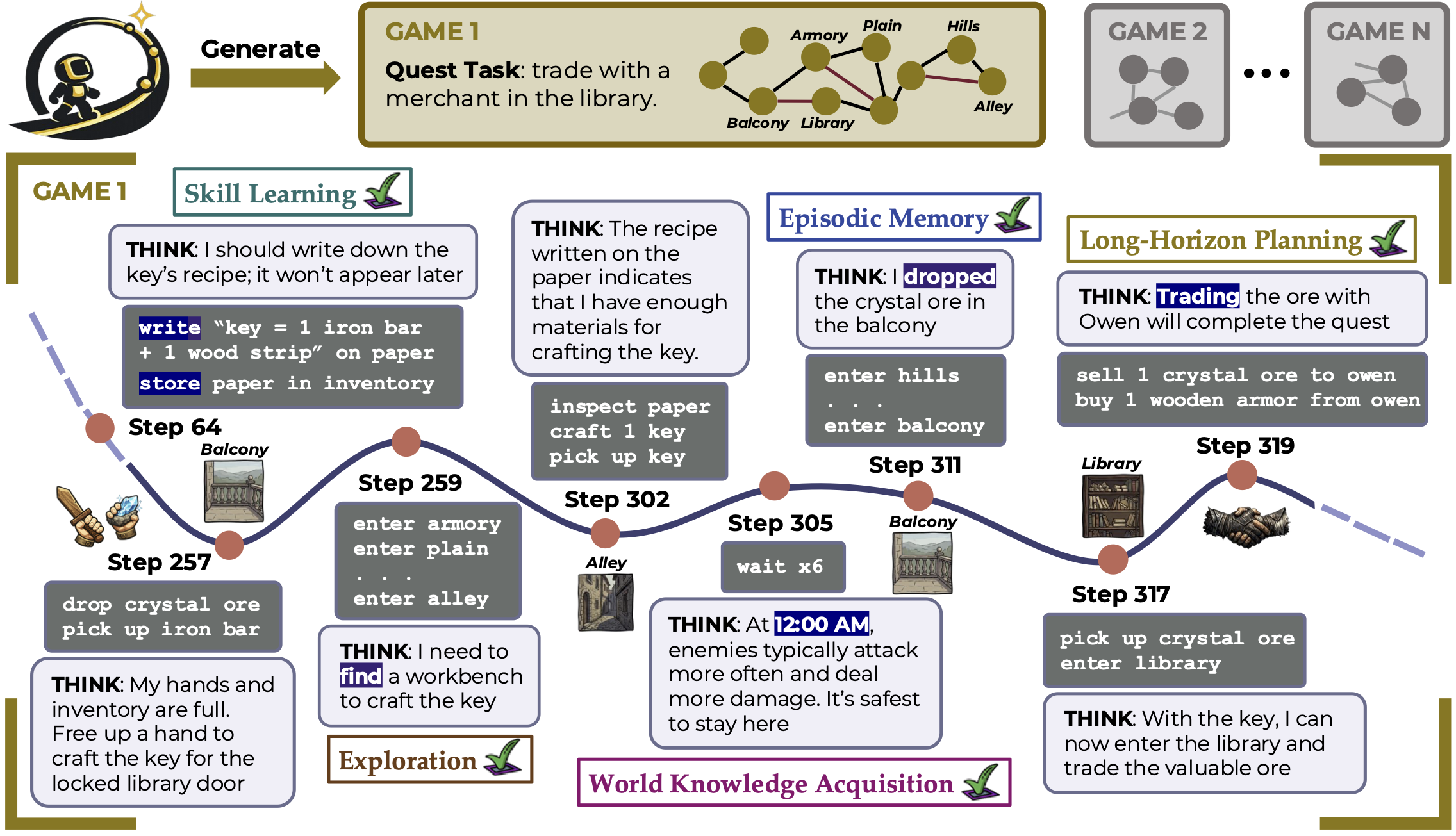
AgentOdyssey is a lightweight interactive environment that supports both novel game generation and a unified agent interface. It is designed to evaluate test-time continual learning across five key abilities: exploration, world knowledge acquisition, episodic memory, skill learning, and long-horizon planning.
This guide walks you through setting up AgentOdyssey and running your first game.
Prerequisites
- Python 3.12+
- Conda (recommended for environment management)
- CUDA-capable GPU(s) (required for local models; not needed if using only API-based LLMs such as OpenAI)
1. Environment Setup
Create a Conda environment and install the dependencies. The installation you need depends on which agents to use.
Minimal install — enough if you only want to run HumanAgent (play the game yourself) or run the RandomAgent (which randomly samples an available action each turn):
conda create -n agentodyssey python=3.12 && conda activate agentodyssey
pip install gymnasium termcolor psutil
Full install — required for LLM-based agents (RAG, Long-Context, Parametric, etc.):
conda create -n agentodyssey python=3.12 && conda activate agentodyssey
pip install -r requirements.txt               # core + LLM dependencies
conda install pytorch::faiss-gpu              # GPU-accelerated vector search (needed by RAG agents)
pip install flash-attn --no-build-isolation
Note: If you do not have a GPU, you can replace
faiss-gpuwithfaiss-cpu(pip install faiss-cpu).
To use proprietary LLMs, you need to export API keys. For example, for OpenAI:
export OPENAI_API_KEY="your-api-key-here"
2. Quick Start with Game Remnant
The fastest way to try AgentOdyssey is through eval.py, which runs an agent in a game and logs the results.
Play the game yourself
python eval.py --game_name remnant --agent HumanAgent
You will be dropped into an interactive text-world session where you type actions each turn.
Run with an LLM agent
Below are a few common configurations. Every LLM agent needs the --llm_provider ("openai", "huggingface", "vllm", "azure", "azure_openai", "claude", "gemini") and --llm_name flag.
Long-Context Agent with GPT-5:
python eval.py --game_name remnant --agent LongContextAgent --llm_provider openai --llm_name gpt-5
Long-Context Agent with Qwen3-4B (local model via HuggingFace):
python eval.py --game_name remnant --agent LongContextAgent --llm_provider huggingface --llm_name Qwen/Qwen3-4B
RAG Agent with GPT-5:
python eval.py --game_name remnant --agent VanillaRAGAgent --llm_provider openai --llm_name gpt-5
RAG Agent with Qwen3-4B:
python eval.py --game_name remnant --agent VanillaRAGAgent --llm_provider huggingface --llm_name Qwen/Qwen3-4B
Useful flags
For a more detailed list of flags, visit Running Evaluations. Some commonly used flags include:
| Flag | Description |
|---|---|
--max_steps N | Maximum number of environment steps (default 300) |
--seed N | Random seed for reproducibility (default 42) |
--output_dir DIR | Directory where run outputs are saved (default output/) |
--overwrite | If enabled, a new game session will always be created; If not, it will continue the run with the game config if the run dir exists, otherwise, a new game session will be created |
--cumulative_config_save | Save one environment config entry per step (default False) |
3. Using the Python API
If you want to integrate AgentOdyssey into your own Python scripts, for example, to benchmark a custom agent or sweep over hyper-parameters, use the AgentOdyssey.run() wrapper. It accepts the same options as eval.py but as Python keyword arguments.
from agentodyssey import AgentOdyssey

# Play the game remnant yourself
AgentOdyssey.run(game_name="remnant", agent="HumanAgent")

# Evaluate a Long-Context agent on game remnant
AgentOdyssey.run(
    game_name="remnant",
    agent="LongContextAgent",
    llm_provider="openai",
    llm_name="gpt-5",
    max_steps=300,
    seed=42,
)

# Evaluate a RAG agent with reflection enabled
AgentOdyssey.run(
    game_name="remnant",
    agent="VanillaRAGAgent",
    llm_provider="huggingface",
    llm_name="Qwen/Qwen3-4B",
    enable_reflection=True,
    overwrite=True,
)
You can also generate a new game world and immediately run it (visit Game Generation for more details):
from agentodyssey import AgentOdyssey

# Generate a themed game and get a handle to it
game = AgentOdyssey.generate("a pirate-themed island adventure")

# Play it yourself
game.run()

# Or evaluate an LLM agent on it
game.run(agent="LongContextAgent", llm_provider="openai", llm_name="gpt-5")
4. Installing as Package
Installing AgentOdyssey as a package unlocks the agentodyssey CLI and lets you import agentodyssey from anywhere to access the API.
pip install -e .
CLI usage
Once installed, use the agentodyssey command directly:
Play a game yourself:
agentodyssey run --game-name remnant --agent HumanAgent
Evaluate an LLM agent:
agentodyssey run --game-name remnant --agent LongContextAgent --llm-provider openai --llm-name gpt-5
Evaluate a RAG agent with Qwen:
agentodyssey run --game-name remnant --agent VanillaRAGAgent --llm-provider huggingface --llm-name Qwen/Qwen3-4B --max-steps 500
Generate a new game world and run it:
agentodyssey generate "a haunted castle mystery"
agentodyssey run --game-name a_haunted_castle_mystery --agent LongContextAgent --llm-provider openai --llm-name gpt-5
Tip: The CLI uses hyphens (--game-name) while eval.py and the Python API use underscores (--game_name).